Key takeaways
- Keep a home office desk tidy with printable cardstock, a wireless second screen, a chair clamp fix, a desk pen, and a fine mist spray bottle.
- Top Pick: LUXPaper Printable Cardstock, 8.5 x 11, White
- Runner-up: ZMTECH Upgraded Wireless HDMI Display Dongle Adapter
- Also consider: Salbree Office Chair Clamp Sinking Fix
A home office desk tends to collect the same small problems every week. Printed pages pile up because there is no proper stock to print them on, reference documents crowd the main screen, the chair sinks a little lower each day, the one good pen keeps wandering off, and the desktop itself gathers dust and coffee rings faster than anyone wipes it down. None of these problems needs new furniture or a full desk overhaul. They need a small set of helpers that each handle one recurring job.
This guide covers that paper-and-desk layer only: print stock for the pages a home office actually produces, a wireless way to put reference material on a second screen, a clamp that holds a sinking chair at working height, a desk pen that stays at the desk, and a spray bottle that keeps surfaces clean without soaking anything. It is not a roundup of office furniture, printers, or computers, and it sits alongside broader office and study roundups rather than replacing them. Every pick below is judged on how well it handles its one job in a normal home office routine.
As an Amazon Associate, we earn from qualifying purchases.
1. LUXPaper Printable Cardstock, 8.5 x 11, White

Most home office paper problems start with printing everything on the same thin everyday stock. Reference cards curl, desk labels tear, and checklists fall apart in a drawer within a week. A pack of printable cardstock in the standard 8.5 x 11 size gives the desk a second, sturdier tier of paper for the pages that are meant to last: the shortcut list taped beside the monitor, the labeled dividers in a project binder, the contact sheet pinned above the desk, and the sign or notice that goes on a door or wall.
Because the sheets are letter size, they run through a standard home office printer the same way regular paper does, and they trim cleanly with ordinary desk scissors when a smaller card is needed. White stock keeps printed text and simple graphics readable, and it takes pen and marker well for handwritten labels. The sensible routine is to keep everyday drafts on regular paper and save the cardstock for anything that gets handled daily or displayed.
Specs
- Format: printable cardstock sheets
- Sheet size: 8.5 x 11 inches, standard letter size
- Color: white
- Paper weight, sheet count, and printer compatibility: confirm on the listing before ordering, and check that your printer accepts cardstock in its paper settings
2. ZMTECH Upgraded Wireless HDMI Display Dongle Adapter

A crowded main screen is often a paper problem in disguise: people print reference documents because there is nowhere else to put them. A wireless HDMI display dongle gives a home office a simple second screen for exactly that material. Plug the adapter into an HDMI port on a spare monitor or a small TV near the desk, connect it to the computer, and the reference page, spreadsheet, or chat window lives on the second display while the main screen stays clear for the work itself.
The wireless link also removes one cable run across the desk, which matters in the small spare-room and corner setups most home offices use. The dongle suits static reference content well: documents, dashboards, calendars, and message windows that do not change sixty times a second. Compatibility is the one real checkpoint. The adapter has to match your computer, your display, and your network, so confirm compatibility on the listing before ordering, including which devices and systems the dongle supports.
Specs
- Type: wireless HDMI display dongle adapter
- Role: sends a computer display signal to an HDMI screen without a cable run
- Supported devices, resolution, range, and power requirements: confirm on the listing before ordering
- Setup note: an HDMI-equipped spare monitor or TV is needed, sold separately
3. Salbree Office Chair Clamp Sinking Fix

A sinking office chair is one of the most common home office annoyances, and it is usually a worn gas lift cylinder rather than a broken chair. The Salbree fix is a clamp that fits around the chair cylinder and holds the seat at the height you set, so the chair stops its slow daily descent. For a home office, that means the desk setup you adjusted on Monday is still the setup you sit down to on Friday, with your eyes level with the screen and your feet flat on the floor.
The clamp approach suits a chair that is otherwise sound: the seat, back, and base are fine, and only the lift has given up. It is also a tidy fix, since the clamp sits low on the cylinder under the seat and stays out of sight. Fit is the checkpoint here. The clamp has to match the diameter of your chair cylinder, so measure the cylinder and confirm the size range on the listing before ordering. If the chair has other damage, a clamp will not address it, and replacement is the better call.
Specs
- Type: clamp-style sinking fix for office chairs
- Role: holds a chair with a worn lift cylinder at a set height
- Placement: fits around the chair cylinder below the seat
- Cylinder diameter range and included parts: confirm on the listing before ordering
4. ANKAKA 6-in-1 Tactical Pen

Every desk needs one pen that lives at the desk, and the ANKAKA 6-in-1 tactical pen earns that spot by being more than a pen. It writes like a normal desk pen for notes, signatures, and labels, and its multi-function design means a few extra small tools ride along in the same barrel for the odd jobs that come up around a home office: opening a delivery, tightening a loose desk fitting, or marking a measurement on a printed plan. Keeping those functions in the pen you already reach for saves the trip to a toolbox for minor tasks.
The pen has a solid, grippy feel that suits longer writing sessions better than a lightweight giveaway pen, and its clip keeps it parked on a notebook or desk organizer instead of rolling under the monitor. The full list of its six functions is spelled out by the seller, so check the listing for the complete function list and confirm the pen includes the functions you expect before ordering. Ink refill type is also worth confirming on the listing if you plan to keep the pen in service for years.
Specs
- Type: 6-in-1 multi-function tactical pen
- Role: everyday desk writing plus built-in extra functions for small tasks
- Full function list and ink refill details: confirm on the listing before ordering
- Carry note: pocket clip for a notebook, shirt, or desk organizer
5. RELANOR Continuous Spray Bottle
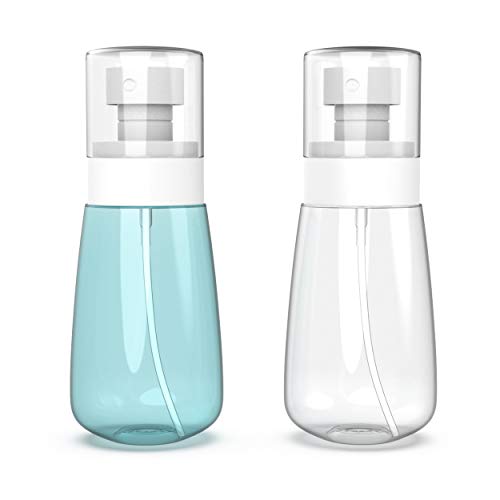
Desk surfaces collect dust, fingerprints, and drink rings, and the usual fix, a quick splash from a standard spray bottle, delivers an uneven soaking that nobody wants near a keyboard. The RELANOR continuous spray bottle produces a fine, even mist that keeps going while the trigger is held, which makes it well suited to desk care: mist a cloth, then wipe the desktop, the monitor frame, and the shelf edges. Spraying the cloth rather than the equipment keeps liquid where it belongs, on the cloth, and off the electronics.
The fine mist also stretches a small amount of water or desk-safe cleaner across a wide area, so a single fill handles many wipe-downs. Around a home office the same bottle covers plant leaves on the desk shelf and the occasional misting job in the rest of the room. Bottle capacity, spray settings, and which liquids the bottle suits are details to confirm on the listing before ordering. Whatever cleaner you use, follow that cleaner label directions and keep all liquids away from open ports and vents.
Specs
- Type: continuous spray bottle
- Spray style: fine, even mist that continues while spraying
- Role: desk surface care when used with a cloth, plus general room misting
- Capacity, spray settings, and suitable liquids: confirm on the listing before ordering
How to Choose Home Office Paper Helpers
Start with the job that annoys you most often, because each of these picks solves one specific problem rather than the whole desk. If printed pages fall apart, the cardstock is the first buy, and the checkpoint is printer compatibility and paper weight on the listing. If you print reference pages just to see them, the wireless dongle is the fix, and the checkpoint is device compatibility on the listing. A sinking chair calls for the clamp, with the cylinder diameter measured before ordering. A wandering pen problem ends with one capable pen that stays clipped at the desk, and a dusty desktop ends with a mist bottle and a cloth kept within reach.
Two habits make all five picks work better. First, give each helper a fixed home: cardstock beside the printer, the pen clipped to one notebook, the bottle under the desk edge. Helpers that live in one place get used; helpers that float get lost. Second, read the listing details before ordering rather than after, especially compatibility and size details, since those are the facts that decide whether a helper fits your printer, your display, or your chair.
Frequently Asked Questions
Will the LUXPaper cardstock run through a standard home printer?
The sheets are standard 8.5 x 11 letter size, which is the size home printers are built around. Cardstock is thicker than everyday paper, so check your printer paper settings and confirm the paper weight and printer compatibility on the listing before ordering a pack.
Does the ZMTECH dongle replace a monitor cable for every task?
It replaces the cable for the second screen role this guide describes, showing reference documents, calendars, and message windows on a spare display. Fast-moving content places heavier demands on a wireless link, so confirm the supported devices and performance details on the listing and match the dongle to the way you plan to use it.
Will the Salbree clamp fit any office chair?
The clamp is made for chairs with a standard lift cylinder, and fit depends on the cylinder diameter. Measure your chair cylinder first, then confirm the size range on the listing. A chair with damage beyond a sinking lift needs repair or replacement instead.
How should the RELANOR bottle be used around desk electronics?
Mist a cloth and wipe surfaces with the cloth, rather than spraying equipment directly. That keeps liquid off ports, vents, and screens while still lifting dust and rings from the desktop. Confirm capacity and suitable liquids on the listing, and follow the label directions of any cleaner you put in the bottle.
Final Verdict
A tidy home office desk is mostly a set of small jobs done by the right small tools. The LUXPaper cardstock gives printed pages a sturdier tier to live on, the ZMTECH dongle moves reference material onto a second screen without another cable, the Salbree clamp holds a sinking chair at working height, the ANKAKA pen keeps writing and a few extra functions in one clipped place, and the RELANOR bottle turns surface care into a quick mist and wipe. Check the compatibility and size details on each listing, give every helper a fixed home, and the desk stays the way you set it up.