Key takeaways
- The best kids tablets for learning, reading and travel compared: kid-proof cases, parental controls, screen sizes and battery life for family trips.
- Top Pick: Amazon Fire HD 10 Kids
- Runner-up: Amazon Fire HD 10 Kids Pro
- Also consider: Samsung Galaxy Tab A9+ Kids Edition
A good kids tablet has to survive drops, keep a child inside age-appropriate content, and hold a charge through a long car ride or flight. The market splits into two camps: dedicated kids tablets that lock everything down by default, and standard tablets wrapped in a chunky case with a kids mode on top. Both can work, but they suit different ages and levels of parental involvement.
As an Amazon Associate, we earn from qualifying purchases.
The five tablets below cover that full range: two from Amazon’s Fire Kids line, one Samsung family tablet in a puffy cover, one closed learning system from LeapFrog, and one bundled Android option from Contixo. Each includes parental controls, but their depth, screen size, and travel performance differ more than the product photos suggest.
This article contains affiliate links, and we may earn a commission when you buy through them at no extra cost to you.
Quick Answer
For most families, the Fire HD 10 Kids is the safest first tablet for ages 3–7, while the Fire HD 10 Kids Pro suits older children who want a slimmer case and more freedom. Choose the Samsung Galaxy Tab A9+ Kids Edition for full Android apps, the LeapPad Academy for a closed learning-first system, and the Contixo K103 for a bundled travel kit.
Amazon Fire HD 10 Kids

The Fire HD 10 Kids is built for younger children, ages 3–7. It is the standard Fire HD 10 wrapped in a thick kid-proof case with a built-in kickstand, and that case matters more than any spec: it absorbs the drops, throws, and table-edge knocks guaranteed with this age group. Amazon backs it with a two-year worry-free guarantee: if it breaks, it gets replaced.
The 10.1-inch Full HD screen is large enough for picture books and early reading apps without the squinting a 7-inch display causes. A year of Amazon Kids+ is included, giving access to a large library of ad-free books, videos, games, and apps. Parents manage everything from the Parent Dashboard: age filters, daily time limits, bedtime curfews, and educational goals to meet before entertainment unlocks. Battery life is rated up to 13 hours, covering a full travel day. The trade-off: there is no Google Play, so apps come only from Amazon’s store.
Specs
- Display: 10.1-inch Full HD (1920 x 1200)
- Storage: 32 GB, expandable with microSD up to 1 TB
- Battery life: up to 13 hours
- Case: kid-proof case with kickstand
- Included content: 1 year of Amazon Kids+
- Parental controls: Parent Dashboard with age filters, time limits, educational goals
- Guarantee: 2-year worry-free guarantee
- Target ages: 3–7
Amazon Fire HD 10 Kids Pro

The Kids Pro version is aimed at ages 6–12, and the differences are about trust rather than hardware. The case is slimmer and looks less like a toddler toy, which matters to older children. The screen, storage, and battery match the younger model: a 10.1-inch Full HD display, 32 GB of storage, and up to 13 hours of battery life.
What changes is the software posture. Kids Pro tablets include access to a digital store where children can browse and request apps, ebooks, and videos, but nothing installs until a parent approves the request. That flow is a practical middle step between a fully locked device and an open one. The Parent Dashboard still offers age filters and time limits, a year of Amazon Kids+ is included, and the two-year worry-free guarantee applies. For a child who has outgrown the chunky case but is not ready for an unrestricted tablet, this is the natural upgrade path, though the lack of Google Play remains the main limitation.
Specs
- Display: 10.1-inch Full HD (1920 x 1200)
- Storage: 32 GB, expandable with microSD up to 1 TB
- Battery life: up to 13 hours
- Case: slim kid-friendly case
- Included content: 1 year of Amazon Kids+
- Parental controls: Parent Dashboard, plus digital store with parent approval for requests
- Guarantee: 2-year worry-free guarantee
- Target ages: 6–12
Samsung Galaxy Tab A9+ Kids Edition

Samsung takes the other approach: this is a full Android tablet, the Galaxy Tab A9+, sold with a durable puffy cover and Samsung Kids preloaded. That gives it the longest useful life of any pick here. A younger child can stay inside Samsung Kids, with its PIN-protected exit and app limits, while an older child can graduate to the regular Android side with Google Play and Family Link controls.
The 11-inch screen is the largest in this roundup, which helps with split-screen homework, reading comics, and shared viewing on a plane tray table. Quad speakers make shared viewing easier without headphones. Storage starts at 64 GB and expands with a microSD card, and the listed average battery life is 8.5 hours, shorter than the Fire models but enough for most travel days. The puffy cover protects well against drops, though it is bulky. Because this is a normal tablet at heart, parents carry more setup responsibility: the controls are strong, but they must be configured rather than locked down out of the box.
Specs
- Display: 11-inch
- Storage: 64 GB, expandable with microSD
- Operating system: Android with Samsung Kids preloaded
- Battery life: 8.5 hours (listed average)
- Case: durable puffy cover
- Parental controls: Samsung Kids with PIN exit, plus Google Family Link
- Audio: quad speakers
- Target ages: not stated
LeapFrog LeapPad Academy
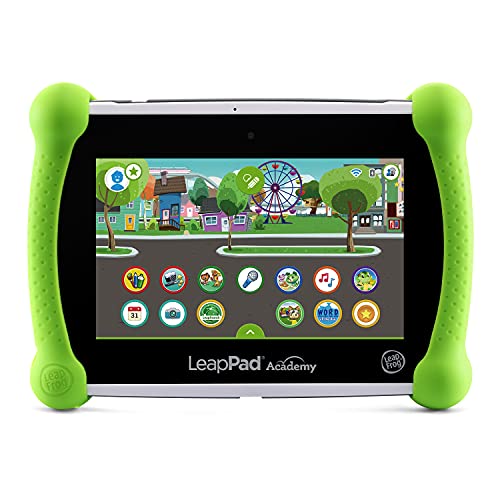
The LeapPad Academy is the most closed system here, and for some families that is exactly the point. It runs LeapFrog’s own learning environment rather than an open app store, with the LeapFrog Academy program guiding children through educator-approved activities covering reading, math, and problem solving. Content grows with the child across age levels, and progress is visible to parents.
The 7-inch screen is shatter-safe and surrounded by a protective bumper, making it easy for small hands to grip and hard to damage. A kid-safe browser allows access only to pre-approved websites, so there is no open internet to worry about. Parental controls cover play time limits and content management, and additional apps come from LeapFrog’s own App Center rather than Google Play, keeping the catalog small but vetted. Storage is modest and the screen resolution basic compared with the Fire and Samsung models, so this is not a video-first device. Exact battery life in hours is not stated in the listing data. Choose it if learning structure matters more than entertainment breadth.
Specs
- Display: 7-inch shatter-safe touchscreen
- Storage: 16 GB, expandable with microSD (maximum card size not stated)
- Content: LeapFrog Academy program and educator-approved apps preloaded
- Browser: kid-safe browser limited to pre-approved sites
- Parental controls: play time limits and content management
- Battery life: not stated
- Target ages: 3–8
Contixo K103 Kids Tablet Bundle

The Contixo K103 is a 10-inch Android kids tablet sold as a complete travel bundle: the tablet, a kid-proof case with kickstand, a stylus, and headphones are all in the box, so a child can use it in the car or on a plane without extra purchases. It comes preloaded with more than 80 Disney storybooks plus teacher-approved learning apps through Contixo Academy, an unusually reading-heavy starting library.
Parental controls allow time limits, app management, and content filtering, though the system is less polished than Amazon’s Parent Dashboard or Samsung Kids, and setup takes a little longer. The tablet runs standard Android, so additional apps can be installed, and storage expands with a microSD card. With 3 GB of RAM and 32 GB of storage, performance suits reading, video, and light games rather than demanding titles. Battery life in hours is not stated in the listing data, so long travel days may need a power bank. For families who want bundle convenience without the Amazon ecosystem, the K103 is a practical middle option.
Specs
- Display: 10-inch
- Storage: 32 GB, expandable with microSD
- Memory: 3 GB RAM
- Included accessories: kid-proof case with kickstand, stylus, headphones
- Included content: 80+ preloaded Disney storybooks and Contixo Academy apps
- Parental controls: time limits, app management, content filtering
- Battery life: not stated
- Target ages: 3–12 (bundle listing)
How to Choose
Start with age and control style. For children under about seven, a dedicated kids tablet with controls locked down by default, such as the Fire HD 10 Kids or LeapPad Academy, saves constant supervision. For children eight and older, look for a request-and-approve system like the Fire HD 10 Kids Pro, or a full tablet like the Samsung whose restrictions can loosen gradually through Family Link.
Next, weigh the ecosystem. Fire tablets have no Google Play, so check that the reading and school apps your family uses exist in Amazon’s store. Android tablets like the Samsung and Contixo run Google Play, which matters if a school assigns specific apps. Then consider the case: thick foam or puffy covers protect best for young children and travel, while slim cases suit older kids.
Finally, match screen and battery to travel habits. A 10- or 11-inch screen is better for reading and shared viewing, while 7-inch models are lighter for small hands. All of these tablets can download books, videos, and apps for offline use, essential for flights. Charge fully the night before and download content on home Wi-Fi.
Who Should Skip
Skip this entire category if your child is a preteen who needs a specific school platform, a full desktop-class browser, or keyboard-based homework tools; a Chromebook or standard tablet with a keyboard will serve them better. Families committed to one ecosystem should also think twice: Apple households may prefer an iPad with Screen Time, and Amazon households gain little from a Samsung.
Also skip the closed learning tablets if your child has outgrown preschool-style content, since the LeapPad Academy’s catalog will feel limiting quickly. And if the tablet is mainly for video streaming at home, a regular shared family tablet is usually simpler.
FAQ
What is the difference between a kids tablet and a regular tablet with a case?
A dedicated kids tablet ships with parental controls active, a curated content library, and a protective case included. A regular tablet can do the same things, but parents must install the controls and buy the case separately.
Can kids tablets be used on a plane without Wi-Fi?
Yes. Books, videos, and apps downloaded at home work offline on all five tablets here. Download enough content before the trip, because streaming is impossible in airplane mode.
What happens when the included content subscription ends?
On the Fire models, Amazon Kids+ renews as a paid subscription unless a parent cancels it; purchased apps remain available. The LeapPad and Contixo libraries are preloaded rather than subscription-based, so their content stays on the device.
How long should a child use a tablet each day?
There is no single number for every family, but these tablets let you set daily limits, schedule downtime, and require educational time before games. Start with a limit you can enforce consistently.
Final Verdict
For a first tablet, the Fire HD 10 Kids remains the easiest recommendation: strong case, deep controls, long battery, and a replacement guarantee. The Fire HD 10 Kids Pro is the better long-term buy for children six and up. Pick the Samsung Galaxy Tab A9+ Kids Edition for full Android access and the biggest screen, the LeapPad Academy for a curated learning path, and the Contixo K103 for an all-in-one travel bundle.